
Appearance
Miella
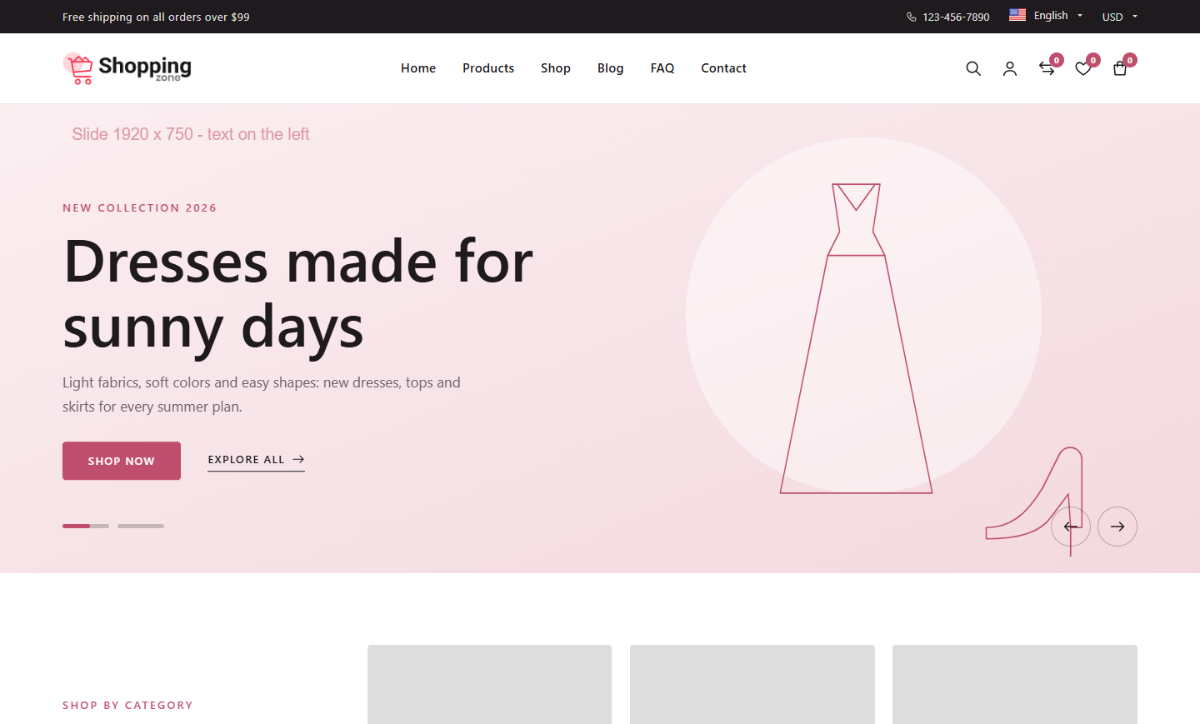
Miella is a fashion storefront theme for girls' and women's clothing: dresses, tops, bags, shoes and accessories. It uses Poppins for headings and Roboto for text, a rose accent (#BF4E6C) on near-black (#1E1A1D), and soft blush surfaces.
Features
- Header: a dark top bar (promo text, hotline, top menu, language and currency), then the logo, a centered menu and search, account, compare, wishlist and bag icons. The search button opens a search panel under the header.
- Product cards: no frame, a 3:4 portrait photo (or square), icons that slide in, and an "Add to cart" bar that rises from the bottom of the photo on hover. On touch screens a small bag button stays visible.
- Category carousel with the heading, text, button and arrows in a column on the side.
- Offer banner mosaic: one tall banner, two stacked, one tall.
- Footer: a newsletter row, store information, widget columns, App Store / Google Play buttons and payment logos.
- Product listings (shop, category, brand, tag, collection, search): a filters panel and a sort menu.
- 16 shortcodes, including text product tabs, product lists, a deal countdown and testimonials. See Shortcodes.
- Sample homepage with placeholder images that show their recommended size.
- RTL support.
Pages the theme doesn't template (product, cart, checkout, account) use the Ecommerce plugin's views, which pick up the theme's colors and fonts.
Requirements
Miella is a child of the Base theme, so Base must be installed (it is hidden from the theme list). No plugin is required, but some features need one:
| Plugin | Used by |
|---|---|
| Ecommerce | product listings, [product-showcase], [product-tabs], [product-lists], [category-tiles], [brand-logos], flash sales in [deal-countdown] |
| Testimonial | [testimonials] |
| Blog | [latest-news] |
| Newsletter | [newsletter-band], the footer newsletter row |
| Mega Menu | product and banner panels in the main menu (optional) |